If the customer gives you a key

Do this:

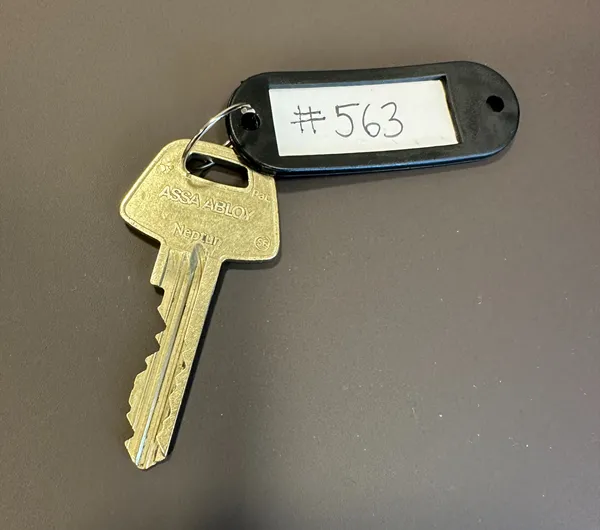
  1. Prepare a key tag.
  2. Write the customer number on the key tag (e.g., #563). You can find the customer number in TimeWave next to the customer’s name. Never write the name or address on the key tag.
  3. Attach the key ring to the key.
  4. Take a photo of the key with the key tag so that the customer number is visible.
  5. Send the photo to office@rozenclean.se so that the office knows you have a key for the customer.
  6. Store the keys securely in your home.
Nyckel4

Codes for alarms and doors

If the customer has an alarm system that we are to use (turning it off when we arrive and turning it on when we leave), the code should be available in TimeWave. It is very important to carefully follow the alarm instructions to ensure it is handled correctly. If the customer informs you that the code has been changed for any reason, you must inform the office so it can be updated in TimeWave.

For apartment buildings and entrance doors with an entry code or door code instead of a key lock, the code should also be visible in TimeWave. If you cannot see the code in the schedule, contact the office so we can enter the correct code and make it visible. Similarly, if the customer has received a new code that has not yet been updated in TimeWave, you must notify the office so we can update the information.

Alarm codes and entry codes must never be shared outside the organization.
Cookies

This website uses cookiesfor statistics and user experience.

Rozen Clean AB uses cookies to improve your user experience, to provide a basis for improvement and further development of the website, and to be able to offer more relevant deals to you.

Please read our privacy policy. If you consent to our use, select Allow All. If you want to change your choice later, you will find that option at the bottom of the page.